Residential RDP: A Windows 10 Login Server on a Real Residential IP
Direct Summary: ResRDP provides a Windows 10 residential RDP login server routed through a 100% static US residential IP from AT&T, Verizon, Spectrum, CenturyLink, or Comcast across 11 US cities. Every server includes 4GB RAM, 1 Gbps network speed, and unlimited bandwidth. Orders accept cryptocurrency only and deliver within 30 mins.
What Is Residential RDP?
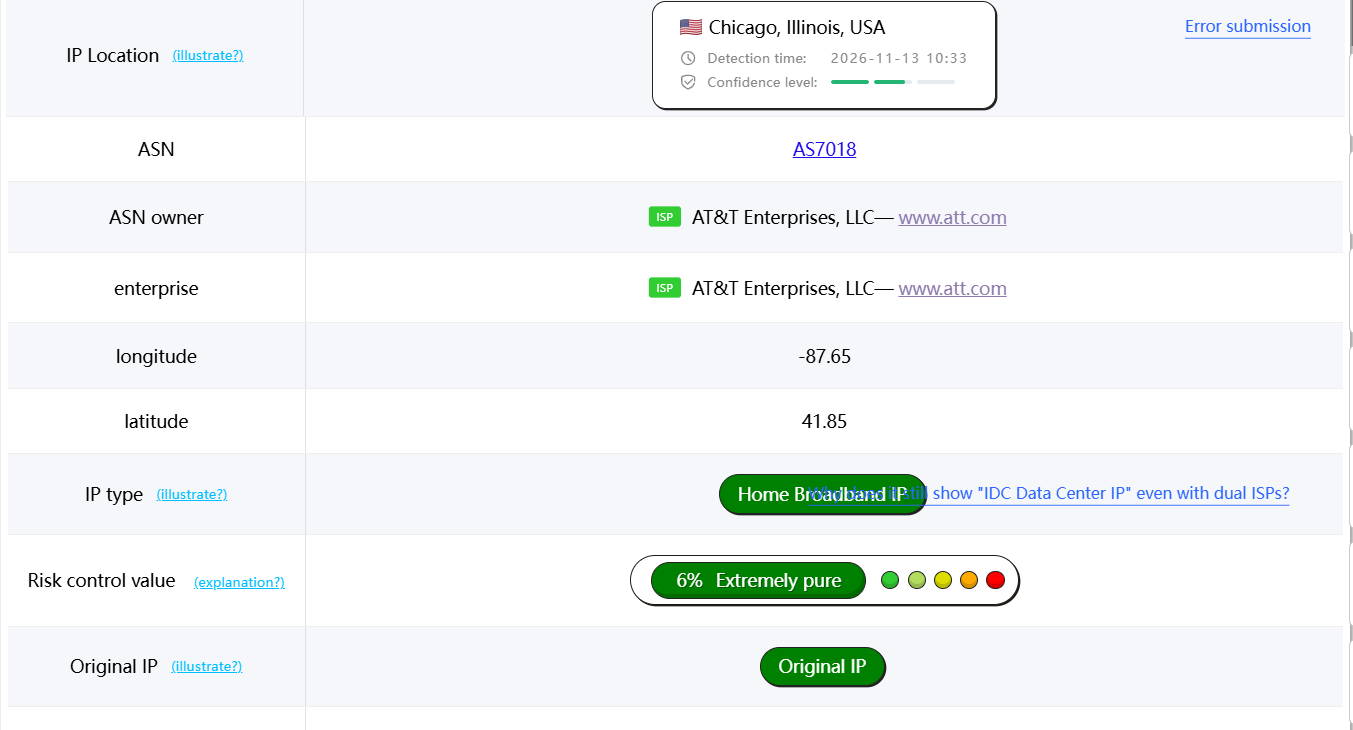
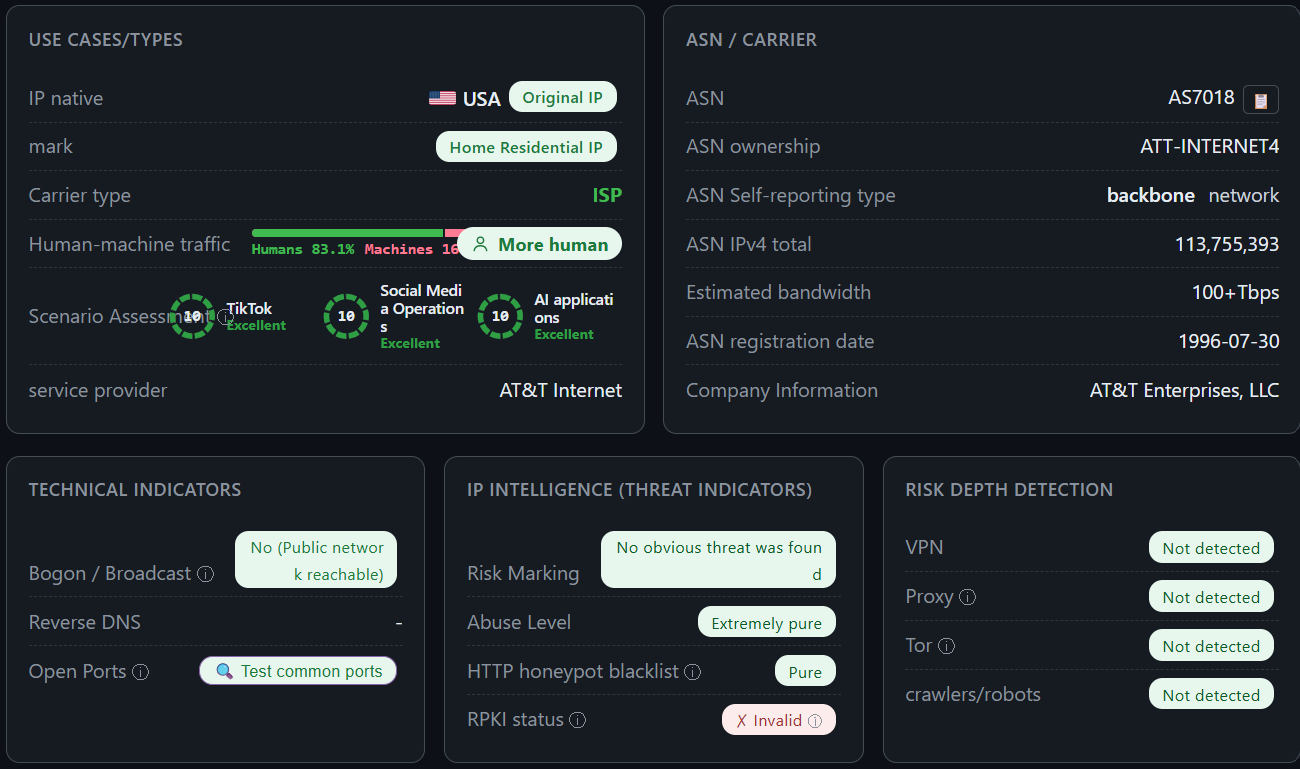
A residential RDP is a remote Windows 10 computer connected to the internet through a physical home or business broadband line from a consumer internet service provider rather than a commercial datacenter. When you connect via Remote Desktop Protocol, every website and application sees a genuine US ISP connection.
Standard remote desktop servers rent IP space from cloud hosting facilities that public databases flag as commercial hosting ranges. An RDP residential setup solves this by pairing a persistent Windows 10 desktop environment with a 100% static IP from major US carriers. If you want a deeper technical breakdown of how the protocol works, read our guide on what is rdp server architecture. Whether you search for residential rdp usa access or a long-term remote workstation, the core benefit remains identical: a stable Windows 10 desktop that behaves like a physical PC sitting on a US broadband circuit.
Why a Residential IP Matters
A residential IP matters because online platforms, verification systems, and regional web services inspect the Autonomous System Number (ASN) and registration record of every incoming connection. Datacenter subnets belong to cloud hosts and are routinely blocked, throttled, or challenged with endless security prompts, whereas consumer ISP ranges pass inspection naturally.
When you use a residential ip rdp connection, your traffic originates from a verified US carrier network. Unlike rotating browser proxies that drop sessions or leak browser fingerprints, a full Windows 10 desktop keeps your browser profile, cookies, local storage, and network route locked to one static residential IP address. To understand how carrier ASN records differ from commercial hosting blocks, review our explainer on what is a residential ip. You can also compare protocol and server terminology in our rdp vps guide or view our sister product page for residential vps hosting.
What You Get: Windows 10, 4GB RAM, 1 Gbps, Unlimited Bandwidth
Every server is provisioned with fixed, verified hardware and network specifications designed for responsive daily remote desktop sessions:
- Operating System: Windows 10 pre-installed and ready for Remote Desktop login.
- Memory: 4GB RAM allocated to your Windows 10 environment.
- Network Speed: 1 Gbps port speed for smooth screen rendering and fast file transfers.
- Bandwidth: Unlimited bandwidth with zero monthly data caps or throttling.
- IP Assignment: 100% static residential IP address from your chosen US carrier and city (with an optional $65 brand-new, never-used IP tier).
- Connection Credentials: Direct IP address, RDP port, username, and password delivered straight to your dashboard.
- Payment Method: Cryptocurrency only.
- Delivery Time: Within 30 mins.
When you buy rdp server access or look for a dedicated rdp environment, transparency matters. You get a clean Windows 10 desktop where your session resources and static ISP IP remain assigned to your account for the entire billing cycle, making it simple to buy windows rdp capacity or buy rdp vps access without hidden bandwidth fees.
What You Can Do on the Server
Your ResRDP login gives you a private Windows 10 desktop session accessed via your assigned IP, port, username, and password. Inside your Windows 10 environment, you can run web browsers, manage multi-account workflows, perform location-specific QA testing, and maintain persistent 24/7 browser sessions on a static US ISP connection.
Because ResRDP operates as a managed infrastructure provider, you do not have to worry about underlying hypervisor maintenance. You log in and use the Windows 10 desktop for your daily work, while low-level system administration, including hardware reboots, server restarts, and operating system reinstallations, is handled directly by ResRDP on the backend. If you prefer hosted infrastructure over maintaining a local computer at home, our managed model keeps your remote desktop online 24/7 without hardware headaches.
Pay With Bitcoin and Crypto
ResRDP operates on a strict cryptocurrency-only payment model to ensure fast, private, borderless settlement without credit card chargebacks or banking delays. We do not accept credit cards, debit cards, PayPal, or Perfect Money under any circumstances.
You can buy rdp with bitcoin, buy rdp with crypto, or buy rdp with btc directly through our self-serve client portal at app.resrdp.com. Once your cryptocurrency transaction confirms on the blockchain, we prepare your Windows 10 login server on the exact US ISP and city you selected and posts your IP, port, username, and password inside your dashboard.
Where to Buy RDP in the USA
Knowing where to buy rdp in the United States requires separating genuine ISP-backed providers from budget resellers who repackage noisy datacenter subnets as residential lines. Many buyers searching where can i buy rdp or browsing rdps for sale end up with overcrowded servers that lose their IP reputation within days.
When buying rdp infrastructure or comparing options to buy usa rdp, verify that the provider names the exact US carrier and city before checkout. Note that while some users search to buy remote desktop software licenses from Microsoft, ResRDP provides the complete hosted Windows 10 server and static residential IP together. Whether you want to buy rdp online, find a reliable rdp for sale, or buy rdp usa capacity for your team, follow our step-by-step checklist on how to buy rdp to evaluate providers properly.
USA RDP: Choose Your State and ISP
When you order a usa rdp from ResRDP, you select both your target US carrier and city so your static IP matches your geographic requirements. As a leading option for buyers seeking the best rdp provider in usa coverage, our us rdp and rdp usa infrastructure spans 5 major carriers and 11 US cities:
- AT&T (9 Cities): Order an AT&T VPS and RDP in chicago vps (Chicago, IL), atlanta vps hosting (Atlanta, GA), san francisco vps (San Francisco, CA), boston vps hosting (Boston, MA), Nashville, TN, Kansas City, MO, Orlando, FL, Columbus, OH, and Milwaukee, WI.
- Verizon (1 City): Order a Verizon VPS and RDP in the Bronx, NY via our new york rdp location hub.
- Spectrum (1 City): Order a Spectrum VPS and RDP hosted in Orlando, FL.
- CenturyLink (1 City): Order a CenturyLink VPS and RDP hosted in Orlando, FL.
- Comcast (1 City): Order a Comcast VPS and RDP on Comcast Cable / Business lines in Leesburg, VA.
Every usa rdp server includes the same Windows 10, 4GB RAM, 1 Gbps, and unlimited bandwidth specs regardless of state. For a complete state-by-state breakdown, visit our guide to buy rdp by state.
Residential RDP vs Private RDP
Buyers comparing a private rdp against a residential RDP often confuse server isolation with IP provenance. Both give you an individual login session, but the network routing is completely different. Read our full comparison of private rdp vs residential rdp or review the summary table below before you buy private rdp plans:
| Feature | Residential RDP (ResRDP) | Standard Private RDP |
|---|---|---|
| IP Source & ASN | 100% Static US ISP IP (AT&T, Verizon, Spectrum, CenturyLink, Comcast) | Commercial Datacenter IP (Cloud or hosting ASN) |
| Session Allocation | Dedicated Windows 10 login (IP, Port, Username, Password) | Single-user Windows session on a datacenter host |
| Hardware & Network | 4GB RAM, 1 Gbps port, Unlimited bandwidth | Varies by datacenter reseller and bandwidth cap |
| System Maintenance | Reboots, OS reinstalls, and restarts managed by ResRDP | Often unmanaged or self-managed |
Pricing, Delivery, and How to Order
All orders, renewals, and server credentials are managed through our self-serve client dashboard at app.resrdp.com. Every order is provisioned manually and delivered within 30 mins after cryptocurrency payment confirmation.
Standard Static Residential RDP
Ideal for ongoing remote desktop operations requiring a 100% static US residential ISP IP address.
- 100% Static Residential IP (Choose ISP & City)
- Windows 10, 4GB RAM, 1 Gbps, Unlimited Bandwidth
- IP, Port, Username & Password Access
- Managed Reboots & Reinstalls via Support
- Delivered Within 30 Mins
Brand-New IP Residential RDP
Guaranteed brand-new, never-used 100% static US residential IP provisioned exclusively for your account.
- Brand-New, Never-Used Static Residential IP
- Windows 10, 4GB RAM, 1 Gbps, Unlimited Bandwidth
- IP, Port, Username & Password Access
- Managed Reboots & Reinstalls via Support
- Delivered Within 30 Mins
To learn more about our infrastructure and operations, visit About ResRDP.
Frequently Asked Questions
What makes ResRDP the best residential rdp provider in the USA?
When buyers search for the best residential rdp or best residential rdp provider, they need verifiable US carrier IPs and consistent uptime. ResRDP connects your Windows 10 server directly to static AT&T, Verizon, Spectrum, CenturyLink, and Comcast circuits with 4GB RAM, 1 Gbps speed, and unlimited bandwidth.
Are the residential IP addresses static or rotating?
Every IP address we assign is 100% static. Your IP does not rotate during your billing period. If you need a fresh IP that has never been used by any previous customer, select the $65 Brand-New IP plan at checkout on app.resrdp.com.
What credentials do I receive and how do reboots work?
When you buy residential rdp or buy rdp residential access from us, you receive your server IP address, connection port, username, and password. To keep your residential network interface stable, hardware reboots, restarts, and OS reinstallations are managed on our side whenever you request them.
What port does the Windows 10 RDP server use to connect?
You connect using Microsoft Remote Desktop (`mstsc.exe` on Windows or Windows App on Mac) using the exact IP address and port provided in your dashboard. By default, Windows Remote Desktop communicates over TCP port 3389; read our rdp port guide for full connection details.
How fast is server delivery after I pay with crypto?
Once your cryptocurrency payment is confirmed on app.resrdp.com, our team provisions your server manually and delivers your login credentials within 30 mins.